"Hi all! I currently own just an iPhone 15 Pro Max (on installment with ATT), but am thinking about purchasing an Android phone to use occasionally, too. My question is, can I transfer my iPhone's eSIM to an android phone? Is it even possible? I'm seeing conflicting answers online."
- A Post from Reddit
While physical SIM cards could simply be swapped with a pin tool, eSIMs (Embedded SIMs) are digital and tied to your device software. If you want to transfer eSIM from iPhone to Android, follow this guide. It will walk you through the process of transferring your eSIM, moving your contacts, and answering the most common questions about this transition.
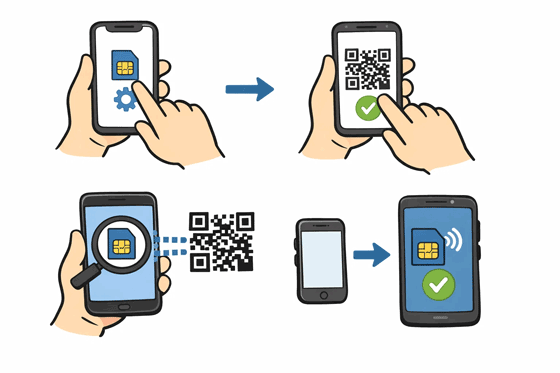
The answer is yes, but with a catch. Unlike transferring an eSIM from one iPhone to another (which uses Apple’s "Quick Transfer" via iCloud), there is currently no native, one-click button to move an eSIM directly from iOS to Android. This is because Apple and Google use different proprietary protocols for their eSIM management.
To make the move, you will almost always need to involve your mobile carrier. The process involves "deactivating" the profile on your iPhone and "reactivating" a new profile on your Android device using a QR code or an activation string provided by your service provider.
Tips: If you want to switch a physical SIM card from an iPhone to an Android device, this guide will help.
If you want to change your eSIM from an iPhone to an Android phone, you need to complete the following steps. Since there is no direct "Send to Android" button in the iOS settings, the process is not as simple as transferring data from iOS to Android.
Step 1: Ensure your Android phone is carrier-unlocked and supports eSIM technology. Log into your carrier's mobile app or website.
Step 2: Look for a section labeled "My Devices" or "SIM Management". You will likely need to request a new eSIM activation QR code.
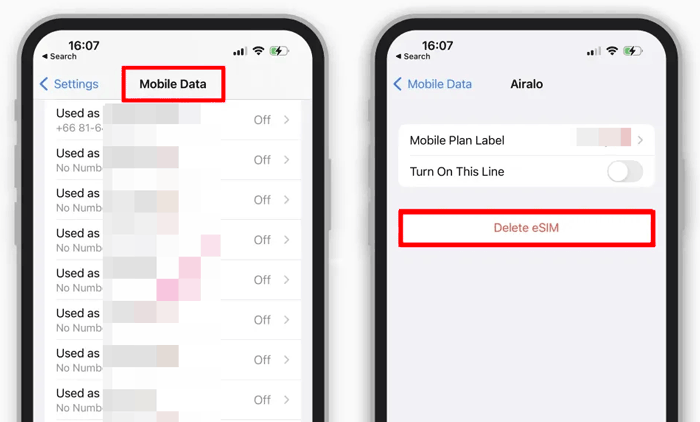
Step 3: Now, remove the eSIM from your iPhone. Go to Settings > "Cellular" or "Mobile Data". Then tap the eSIM you want to move.
Step 4: Select "Delete eSIM" or "Remove Cellular Plan". Please do this only after you have the new QR code from your carrier ready.
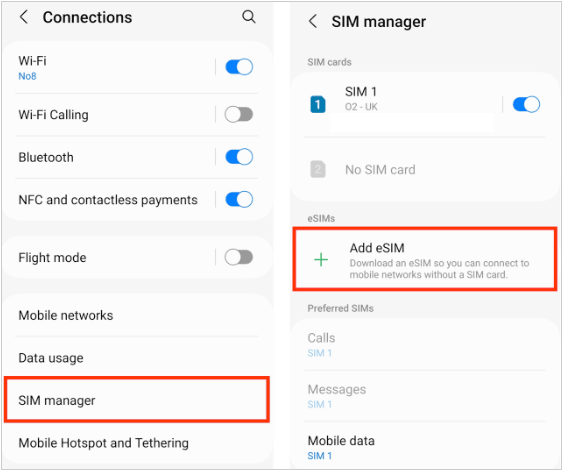
Step 5: On your Android device, go to Settings > "Network & Internet" or "Connections" > "SIMs" or "SIM manager" > "Add eSIM" or "+". Then scan the QR code provided by your carrier, and follow the on-screen prompts to finish activation.
If you just want to transfer your contacts from your iPhone to an Android phone, you can copy all your contacts directly with this contact transfer software - Samsung Data Transfer, instead of switching your eSIM. This software supports most iOS and Android devices, such as iPhone, iPad, Samsung, OnePlus, Google, Motorola, Tecno, itel, TCL, Honor, Vivo, OPPO, realme, Xiaomi, and more.
- Seamlessly transfer contacts from iPhone to Android via USB.
- Transfer other data like photos, videos, music, documents, and more.
- Allow you to select data types before transferring them.
- Support Android to Android transfer, and iOS to iOS transfer.
- Compatible with Android 6.0 or later, and iOS 5.0 or higher.
Download the correct version on your computer.


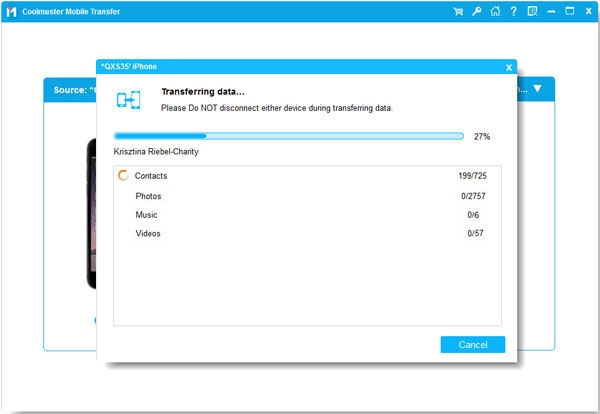
Download and install the data transfer software on a computer. Launch it and connect both your mobile phones to the computer with USB cables.
On the iPhone, please click "Trust". On the Android phone, enable the USB debugging mode. The program will quickly recognize both devices. Now, ensure your Android smartphone is the "Destination" device.
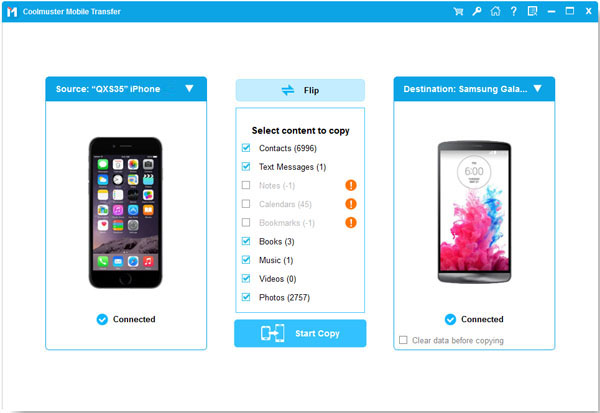
Choose the "Contacts" option, and click "Start Copy" to transfer your iPhone contacts to the Android phone.
Q1: Can I activate eSIM in two phones?
Generally, no. An eSIM profile is designed to be unique to a single device for security and network integrity. While some carriers offer "Number Sharing" services for smartwatches (like an Apple Watch or Galaxy Watch), you cannot have the exact same eSIM profile active on two different smartphones simultaneously.
Q2: Why can't I transfer my eSIM to another phone?
There are three common reasons:
Q3: What are the disadvantages of dual eSIM?
Using two eSIMs (Dual SIM mode) is great for balancing work and personal lines, but there are minor drawbacks:
It's feasible to transfer eSIM from an iPhone to an Android phone. But it is rarely a direct or automatic process. Success depends largely on carrier policies and device compatibility. While this may seem inconvenient, the alternative method - using Samsung Data Transfer, allows you to move contacts and data independently, ensuring a smooth transition overall. Thus, you can switch platforms smoothly.
Related Articles
Effortlessly Transfer SIM Card Data to Computer without Data Loss
How to Fix No SIM Card Error on Android with 14 Helpful Solutions
How to Transfer Contacts to SIM Card on Android Phone [Solved]
Effectively Transfer Call Logs from iPhone to Android in 3 Ways

Sophie Green, Chief Editor of Samsung-messages-backup website, has been focusing on the realm of Android Recovery, Android Transfer (Backup), Android Device Tips, Phone Clean, and Phone Transfer technologies. Recognized contributions on leading platforms attest to her esteemed expertise and reliability.
Copyright © samsung-messages-backup.com All Rights Reserved.